%20(1).avif)
.jpg)
The real challenge with managing multiple social media accounts isn't just about posting; it's about showing up consistently and engaging your audience across different platforms without it becoming your entire job. The secret lies in creating a smart system—one built on the right tools, efficient workflows, and clear goals. Without this structure, you’re just setting yourself up for burnout and mediocre results.
Why Managing Social Media Feels Overwhelming

It’s not just big brands juggling multiple platforms anymore. Creators, small business owners, and solo professionals are all expected to be active across the social media sphere to connect with their audience. This pressure to be everywhere at once is a fast track to exhaustion and scattered, ineffective efforts.
Globally, there are around 5.45 billion social media users—that's roughly 67.1% of the world's population. People aren't just sticking to one network, either; the average person uses about seven different platforms every month. This means businesses have to manage several accounts just to keep up. If you're curious, you can explore more social media statistics to really grasp the scale of it all.
The Myth of "Being Everywhere"
So many entrepreneurs and marketers fall into the "be everywhere" trap. They think having a presence on every platform is the key to success. This usually devolves into a copy-paste strategy where the exact same message gets blasted across LinkedIn, Instagram, and TikTok, completely ignoring what makes each platform unique.
Let's be honest: that approach almost never works.
Each network has its own vibe, its own unwritten rules, and its own audience expectations. A polished, professional update that gets great engagement on LinkedIn will likely feel stuffy and out of place on Instagram, where visual storytelling reigns supreme.
The goal isn't to be everywhere. It's to be effective where your audience actually spends their time. A strong, focused presence on two or three key platforms will always beat a weak, generic presence on ten.
The True Cost of Disorganization
Juggling social media without a system quickly turns into a chaotic mess of last-minute posts and missed opportunities. This disorganization isn't just stressful; it has real, tangible consequences for your brand.
It's easy to see the difference between a reactive, manual approach and a strategic one. The "juggling" method feels like you're constantly putting out fires, while a strategic approach allows you to build something meaningful.
Manual vs Strategic Social Media Management
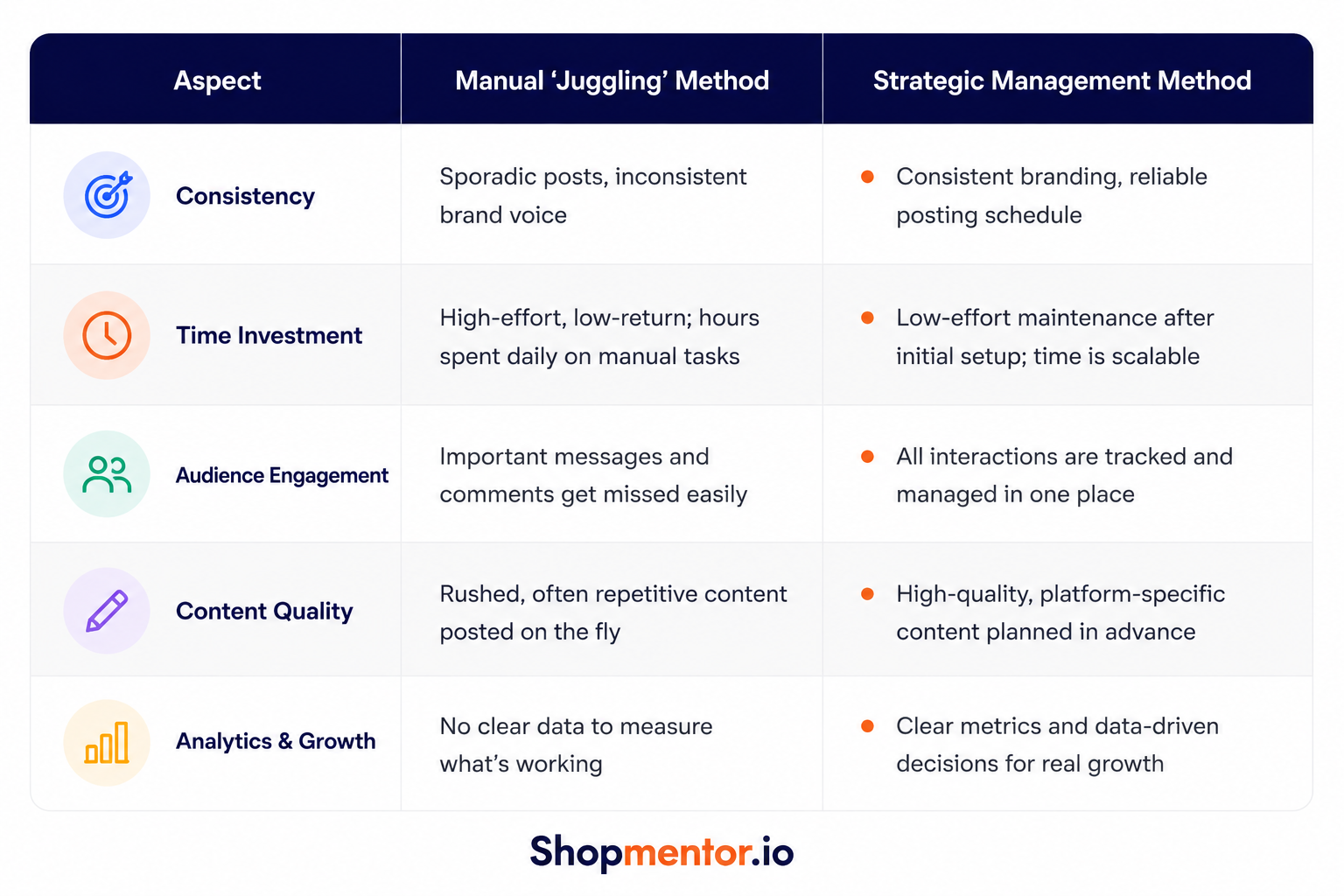
When you're stuck in a disorganized cycle, you're not just wasting time—you're actively damaging your brand's potential. Here’s what that looks like in practice:
- Inconsistent Branding: Your tone of voice shifts from one post to the next, which can confuse potential customers and weaken your brand identity.
- Wasted Time: Think about all the minutes spent logging in and out of different apps, checking analytics on each one, and manually posting content. It adds up fast.
- Audience Neglect: When you're overwhelmed, important comments and DMs inevitably slip through the cracks. That’s not just a missed engagement opportunity; it's poor customer service.
- Burnout: The constant pressure to create and post without a solid plan is the quickest way to kill your creativity and drain your energy.
Ultimately, a disorganized strategy keeps you trapped in a reactive loop. You're too busy putting out fires to ever build a strong, engaged community around your brand.
Build a Cohesive Strategy for Diverse Platforms
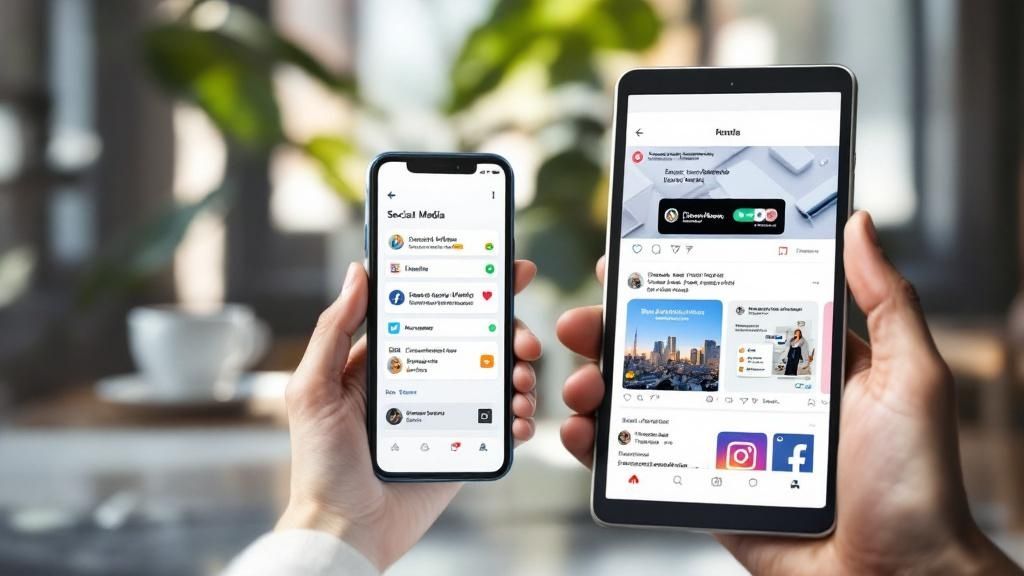
The single biggest mistake brands make when they expand across social media is simply copy-pasting the same message everywhere. It’s a shortcut that leads straight to mediocrity. Every platform has its own unique audience, its own algorithm, and its own unwritten rules.
A truly cohesive strategy isn't about being identical everywhere. It's about respecting those differences while ensuring your core brand identity shines through, no matter the channel. This starts by giving each platform a specific "job." Think of it like building a team—every member has a unique skill set that contributes to the overall goal.
Define Each Platform's Purpose
Before you even think about posting, stop and ask the most important question: "Why are we really on this platform?" If the answer is just "because our competitors are," you're already off track. A clear purpose for each account is what keeps your content from feeling random and disconnected.
Let's take a local restaurant as a real-world example. Here’s how they could assign jobs to their channels:
- Instagram: This is their visual menu and storyteller. It’s for mouth-watering photos of new dishes, behind-the-scenes Reels of the kitchen in action, and sharing user-generated content from happy diners. The goal? Make people hungry and drive reservations.
- Facebook: This is their community hub. Here, they post weekly specials, promote upcoming events like live music nights, and run hyper-targeted ads to reach new people in the surrounding zip codes. The purpose is all about building local loyalty.
- X (formerly Twitter): This is their real-time pulse. They use it for quick updates ("We just sold out of the brisket!"), engaging with local food bloggers, and jumping into trending community conversations. The goal is to be timely and relevant.
A powerful strategy isn't about being active everywhere; it's about being intentional on the platforms that matter most. When each channel has a distinct role, they work together to amplify your marketing instead of just echoing each other.
Adapt Your Voice Without Losing Your Identity
Maintaining a consistent brand voice is non-negotiable, but that doesn't mean your tone can't shift. Your core personality—whether it’s witty, professional, or nurturing—should always be recognizable. The trick is to adapt how you express that personality to fit the culture of each platform.
For instance, your LinkedIn presence will naturally be more buttoned-up and industry-focused. But on Instagram, you can afford to be more casual, use more emojis, and show a personal side. This nuance shows you "get" the environment, which is key to building credibility with each audience. This is a cornerstone of the best marketing strategies for small businesses—connecting authentically wherever your customers are.
The number of social media user identities shot up to an estimated 5.24 billion worldwide in early 2025, a 4.1% jump in just one year. As DataReportal's latest social media insights show, people and brands alike are getting smarter about using multiple profiles to connect with different audiences. By defining a clear purpose for each of your accounts, you’re simply applying that same smart strategy to your business.
Find the Right Tools to Unify Your Workflow

You can have the most brilliant social media strategy in the world, but without the right tech, it’s just a plan on paper. Trying to juggle every platform by hand is a surefire way to burn out and let great opportunities slip through the cracks. The right tools are your best friends in this game, turning a complex web of tasks into a smooth, manageable daily routine.
Thankfully, you're not on your own here. A whole industry of social media management tools exists to solve this exact problem. They act as a central hub, pulling everything together so you’re not constantly bouncing between a dozen different apps and browser tabs.
Core Features to Look For
It's easy to get sidetracked by flashy bells and whistles when you're tool shopping. My advice? Stick to the basics first. Focus on the core functions that will actually make a difference in your day-to-day grind. The goal is to find a platform that brings your most frequent, time-consuming tasks under one roof.
Here’s what I consider non-negotiable:
- Content Scheduling: This is the absolute foundation. Any tool worth its salt will let you plan, write, and schedule posts for all your accounts from a single content calendar.
- Unified Inbox: A true game-changer. This feature funnels all your DMs, comments, and mentions from every channel into a single, manageable stream. No more missed messages.
- Analytics and Reporting: You need a clear, consolidated dashboard to see what's working (and what's not) across all your profiles. This saves you from having to pull stats from each native app individually.
- Team Collaboration: If you work with others, look for features that let you assign tasks, set up post-approval workflows, and leave internal notes. It keeps everyone on the same page.
The right tool doesn't just save you time; it gives you the mental space to focus on creating better content. By automating the repetitive tasks, you free up your creative energy for what truly matters—connecting with your audience.
The Rise of AI-Powered Assistance
Lately, the real magic is happening with AI. Modern tools are getting smarter, helping to automate even more of the tedious work. And the results speak for themselves. In 2025, an incredible 90% of businesses using generative AI reported major time savings, while 73% saw real engagement boosts from AI-assisted content. You can dive deeper into these social media trends to see how quickly things are changing.
These AI features can help you:
- Generate Content Ideas: Stuck in a creative rut? Get AI-powered suggestions based on trending topics or your own best-performing posts.
- Optimize Posting Times: Let an algorithm analyze your audience's activity patterns to pinpoint the perfect time to schedule your content for maximum reach.
- Refine Your Copy: Instantly rephrase a caption to fit the unique tone of each social network.
Choosing the right tool is a big decision, as it will become the backbone of your social media operations. To help you compare some of the most popular options, I've put together a table breaking down their core features.
Feature Comparison of Leading Social Media Management Tools
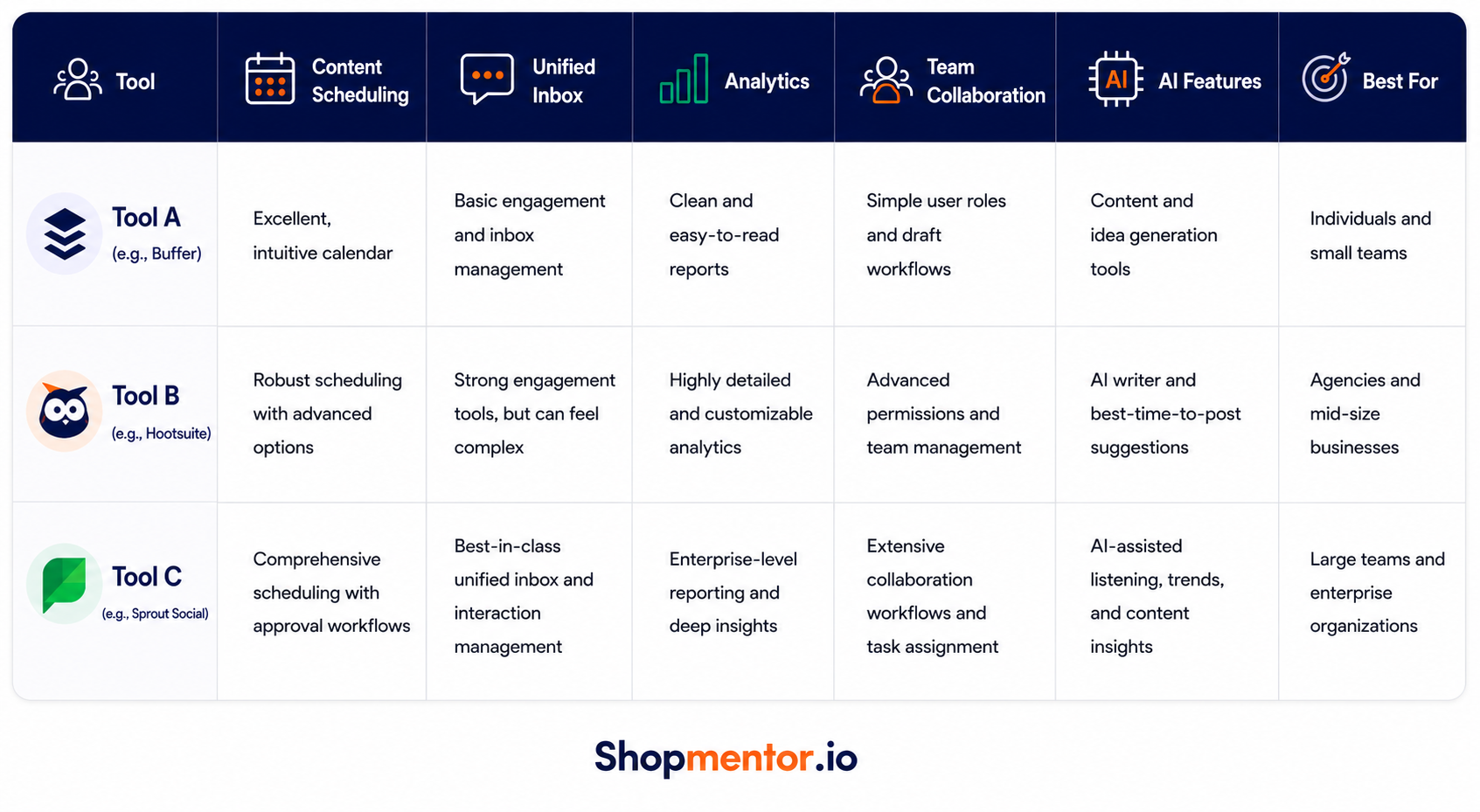
Ultimately, the "best" tool is the one that fits your specific needs and team size. Whether you need the straightforward simplicity of a tool like Buffer or the enterprise-grade power of Sprout Social, take the time to do a free trial. See how it feels to use it every day. An intuitive interface and a workflow that makes sense to you are what will ultimately lead to long-term success.
A System for Managing Multiple Social Media Accounts
Let's be honest: the constant need for new content is the single biggest headache when you're managing multiple social media accounts. You can have the best strategy and the slickest tools, but if you don't have a steady flow of quality posts, you're dead in the water. To get ahead, you need a system—one that favors smart, sustainable creation over last-minute panic.
This is where content batching becomes your best friend. Instead of waking up every day wondering what to post, you block off dedicated time—maybe a single afternoon—to get it all done for the week or even the month ahead. Brainstorming, writing, designing… you knock it all out at once. This frees up so much mental space to focus on what really moves the needle: engaging with your audience.
Build Your Content Pillars
A solid content system starts with your core content pillars. Think of these as the 2-4 main themes your brand will own. They're your North Star, making sure every post is on-brand and genuinely interesting to your followers.
Let's say you're a local marketing agency. Your pillars might look something like this:
- Local SEO Tips: Quick, actionable advice for helping businesses rank better in their own backyard.
- Client Spotlights: Real-world success stories that show you get results.
- Industry News & Updates: Your take on the latest from Google or changes to social platforms.
- Behind the Scenes: A peek at your team, your process, and your company culture.
These pillars give you a reliable framework. Every piece of content you create should ladder up to one of them. It eliminates the guesswork and keeps your messaging razor-sharp. If you're looking for more ways to connect with your community, check out these powerful local business marketing strategies to get your pillar ideas flowing.
A well-defined set of content pillars transforms your content creation from a daily guessing game into a structured, repeatable process. It's the difference between chaos and control.
Master Smart Content Repurposing
Creating brand-new, original content for every single platform is a one-way ticket to burnout. Don't do it. The smarter move is to repurpose. You take one big, juicy piece of content and slice it up into smaller, bite-sized assets perfect for different channels.
This infographic lays out a simple workflow for handling incoming social media mentions—a crucial part of managing your presence and finding new content ideas.

Having a system isn't just for creating content; it's also for handling the engagement that comes back your way.
Here’s what content repurposing looks like in the real world:
- Start with a Blog Post: You write an in-depth guide on "5 Ways to Improve Your Google Business Profile." That's your cornerstone asset.
- Create an X Thread: Each of the five points becomes its own post in a thread. The last post links back to the full article on your blog.
- Design an Instagram Carousel: You design a slick, visual carousel where each slide highlights one of the five tips.
- Film a Short Video: You jump on camera and record a 60-second Reel or TikTok that summarizes the top three tips for quick consumption.
- Write a LinkedIn Update: Craft a more professional post discussing the business impact of an optimized profile, again driving traffic to the original article.
With this approach, you've just turned one major effort into a full week's worth of diverse, platform-native content. That's how you work smarter, not harder.
Streamline Engagement and Measure What Matters
Posting great content is just the first step. The real magic—and the real growth—happens in the trenches: the comments, the DMs, and the mentions that pour in afterward.
If you're managing multiple social media accounts, you know this flood of interaction is often the most overwhelming part of the job. Constantly jumping between apps isn't just inefficient; it's a surefire way to miss opportunities and let conversations fall through the cracks.
This is where a unified inbox saves the day. It's a core feature in most social media management tools for a reason. It pulls all your conversations—Facebook comments, Instagram DMs, X mentions—into a single, manageable feed. This simple change lets you respond faster, keep your brand voice consistent, and make sure no follower or customer ever feels ignored.
Create an Engagement Workflow
A unified inbox is powerful, but a system makes it unstoppable. The best way to do this is by creating a simple workflow using your tool's tagging or labeling features. This helps you instantly categorize incoming messages, prioritize what’s important, and spot trends over time.
You can create a simple but effective system with just a few tags:
- Urgent/Support: A customer has a problem that needs a fast solution.
- Sales Lead: Someone's asking about your pricing, availability, or how to buy.
- Follow-Up: A question you need to look into before you can give a proper answer.
- User-Generated Content: A happy customer shared a photo or review you might want to reshare.
With a system like this, you turn a chaotic inbox into a streamlined command center. It also gives you a bird's-eye view of which platforms are driving support tickets versus sales leads, offering valuable clues about audience behavior. To really make these interactions count, check out our guide on effective social media engagement strategies.
Measure What Actually Matters
It's easy to get lost in a sea of analytics. The secret is to tune out the noise—like vanity metrics such as raw follower counts—and zero in on the Key Performance Indicators (KPIs) that connect directly to your business goals. Instead of trying to track everything, build a simple dashboard that shows you what's actually driving results.
Don't let data intimidate you. A monthly social media audit can take less than an hour and provides all the direction you need to refine your strategy and focus your efforts on what's genuinely working.
Concentrate on the numbers that prove your content is hitting the mark and inspiring action. Key metrics to watch include:
- Click-Through Rate (CTR): What percentage of people actually clicked the link in your post? This tells you if your call-to-action is working.
- Conversion Rate: Of those clicks, how many led to a sale, a sign-up, or whatever action you were aiming for?
- Engagement Rate per Reach: This gives you a much truer sense of how compelling your content is, separate from how many people happened to see it.
By running a quick monthly audit on these core metrics, you can confidently double down on the content and platforms that deliver real value. It’s the fastest way to make your social media efforts more efficient and, ultimately, more profitable.
Frequently Asked Questions
Even with a killer strategy and the right tools, a few practical questions always pop up when you start juggling multiple social media accounts. Let's get them answered so you can move forward with confidence.
These are the things we hear all the time from business owners and marketers just like you who are trying to scale their social media without losing their minds.
How many hours per week should I spend managing social media?
This is the big one, isn't it? The good news is, the answer is probably less than you think. With a solid, streamlined system, you can effectively run 3-5 platforms in just 5-7 hours per week. No, that’s not a typo—it’s just about working smarter.
The magic is all in how you structure your time. It really boils down to two key activities:
- Content Batching (2-3 hours): Set aside one block of time each week to plan, create, and schedule all of your posts. This completely cuts out that daily "what should I post?" headache.
- Engagement (30-45 minutes daily): Jump into your unified inbox a couple of times a day. You can quickly respond to comments, answer messages, and interact with your community without getting sucked into a social media black hole.
Without a system, that number easily swells to 15-20 hours a week. A strategic approach truly gives you your time back.
Are paid social media management tools worth the cost?
For anyone handling more than two social media profiles, the answer is an enthusiastic yes. I know it's tempting to try and save a few bucks by managing everything manually, but you're paying for it with your time—and your time is your most valuable asset.
Think about it this way: if a tool costs $50 a month but saves you five hours of work, you're buying back your time for just $10 an hour. That's a phenomenal return on investment. The sheer productivity you gain from a unified inbox, a content scheduler, and a single analytics dashboard almost always pays for the subscription fee.
Most of the top-tier tools offer a free trial. Use it. Track your time and see how many hours it genuinely saves you. If it’s more than a couple of hours a week, the tool pays for itself.
How do I maintain a consistent brand voice on different platforms?
Consistency doesn't mean sounding like a corporate robot on every channel. The best way to think about it is having "one voice, many tones."
Your core brand personality—your values, your mission, what makes you unique—should be the same everywhere. What changes is your delivery, tailored to fit the platform you're on.
Here’s a simple breakdown of how that looks in practice:
PlatformYour ToneExampleLinkedInProfessional & InsightfulShare industry data, thought leadership articles, and company news.InstagramVisual & AspirationalPost high-quality images, behind-the-scenes Stories, and user-generated content.X (Twitter)Timely & ConversationalJump into real-time trends, share quick tips, and chat with other accounts.FacebookCommunity-Focused & HelpfulPost event updates, ask questions to get discussions going, and share customer stories.
Your brand’s soul stays the same; you just change its "outfit" to match the occasion. A simple one-page brand style guide that outlines your core voice and these platform-specific tones is a fantastic way to keep everyone on your team aligned.
What's the best time to post on social media?
It varies by platform and audience. Use your analytics to see when your followers are most active. Most scheduling tools have a "best time to post" feature that does this for you automatically.
How often should I post on each platform?
Quality over quantity is key. A good starting point is: Facebook (3-5 times/week), Instagram (3-5 times/week), X/Twitter (1-3 times/day), and LinkedIn (2-3 times/week). Adjust based on your engagement data.
Should I post the exact same content everywhere?
No. While you can repurpose content, you should always adapt the caption, image size, and tone to fit the specific platform. Cross-posting the same message everywhere feels lazy to users.
How do I measure the ROI of my social media efforts?
Track metrics that tie back to business goals. This could be website clicks, lead generation form fills from social links, or coupon codes used. Connect social media activity to tangible outcomes.
Hopefully, these answers help you build a more confident and effective social media strategy.
Ready to stop juggling and start managing your social media with confidence? Shopmentor.io pulls all your social media and review site data into one smart dashboard. Get personalized, AI-driven recommendations to improve your online presence and attract more customers, without the guesswork. Start your free trial at https://www.shopmentor.io today.